The Social Web of Bridgerton

Using Gephi and Figma to map the intricate connections of high society from Julia Quinn’s novel series and Netflix TV show — Bridgerton.
DURATION

3 weeks (Mar - May, 2024)

TOOLS

Gephi, Figma, Adobe Illustrator, Tableau, Google Sheets

TEAM

Solo Data Analyst and Designer

SKILLS

Data Cleaning, Data Visualization, Data Analysis, Network Visualization

TEAM

Solo Data Analyst and Designer

TEAM

Solo Data Analyst and Designer

TEAM

Solo Data Analyst and Designer

DURATION

3 weeks (Mar - May, 2024)

DURATION

3 weeks (Mar - May, 2024)

DURATION

3 weeks (Mar - May, 2024)

TOOLS

Gephi, Figma, Adobe Illustrator, Tableau, Google Sheets

TOOLS

Gephi, Figma, Adobe Illustrator, Tableau, Google Sheets

TOOLS

Gephi, Figma, Adobe Illustrator, Tableau, Google Sheets

SKILLS

Data Cleaning, Data Visualization, Data Analysis, Network Visualization

SKILLS

Data Cleaning, Data Visualization, Data Analysis, Network Visualization

SKILLS

Data Cleaning, Data Visualization, Data Analysis, Network Visualization

Overview

A visual dive into the relationships that shape Bridgerton.

This project visualizes the complex web of relationships in the Bridgerton universe, drawing from both the Netflix series and Julia Quinn’s novels. By manually collecting and categorizing data on character interactions, I created a network graph that highlights how deeply intertwined high society is—through romance, family ties, friendships, and more. The final visualization invites viewers to explore the social structure that drives the story forward.

Overview

A visual dive into the relationships that shape Bridgerton.

This project visualizes the complex web of relationships in the Bridgerton universe, drawing from both the Netflix series and Julia Quinn’s novels. By manually collecting and categorizing data on character interactions, I created a network graph that highlights how deeply intertwined high society is—through romance, family ties, friendships, and more. The final visualization invites viewers to explore the social structure that drives the story forward.

Overview

A visual dive into the relationships that shape Bridgerton.

This project visualizes the complex web of relationships in the Bridgerton universe, drawing from both the Netflix series and Julia Quinn’s novels. By manually collecting and categorizing data on character interactions, I created a network graph that highlights how deeply intertwined high society is—through romance, family ties, friendships, and more. The final visualization invites viewers to explore the social structure that drives the story forward.

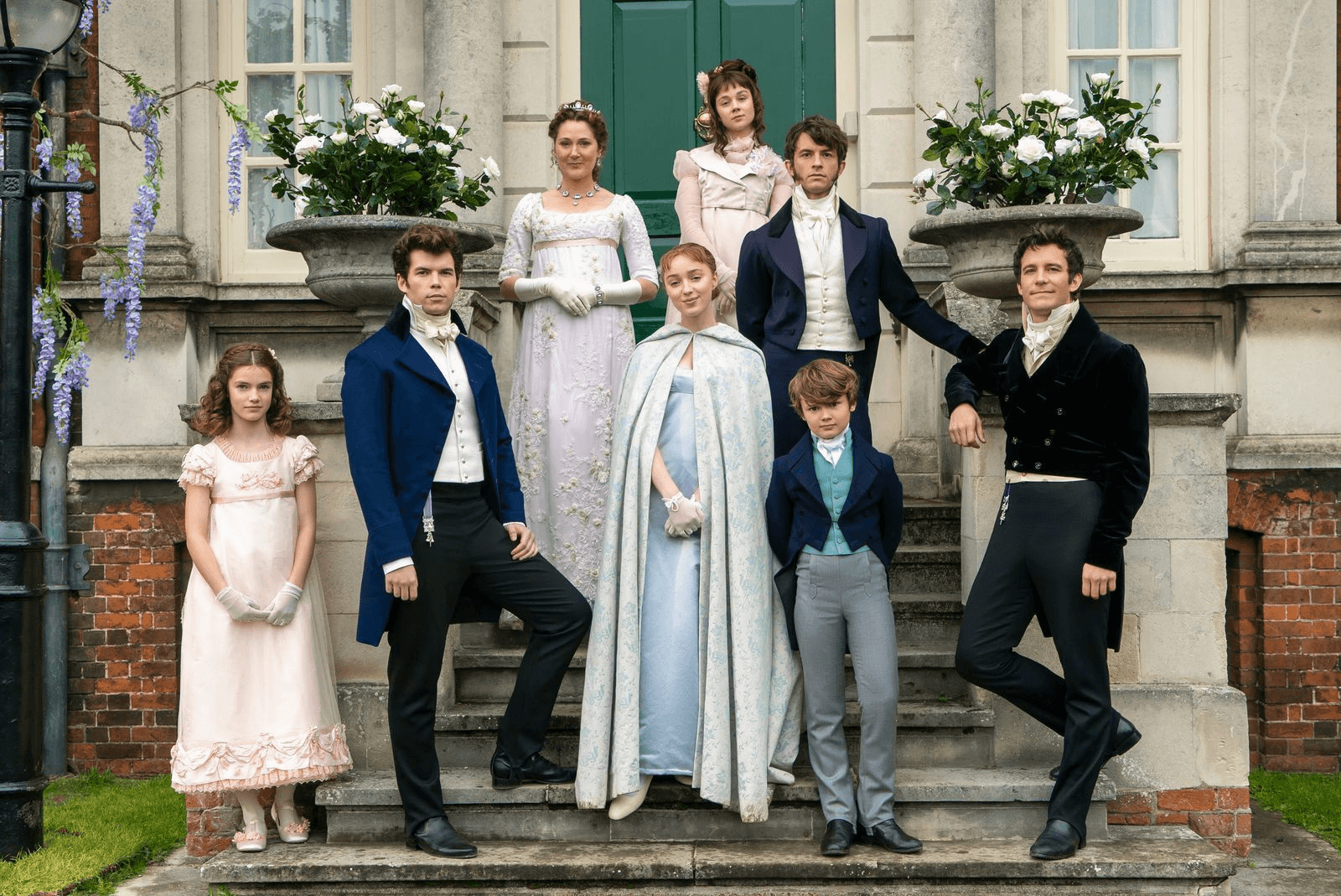
Bridgerton Netfilx series

Bridgerton Netfilx series

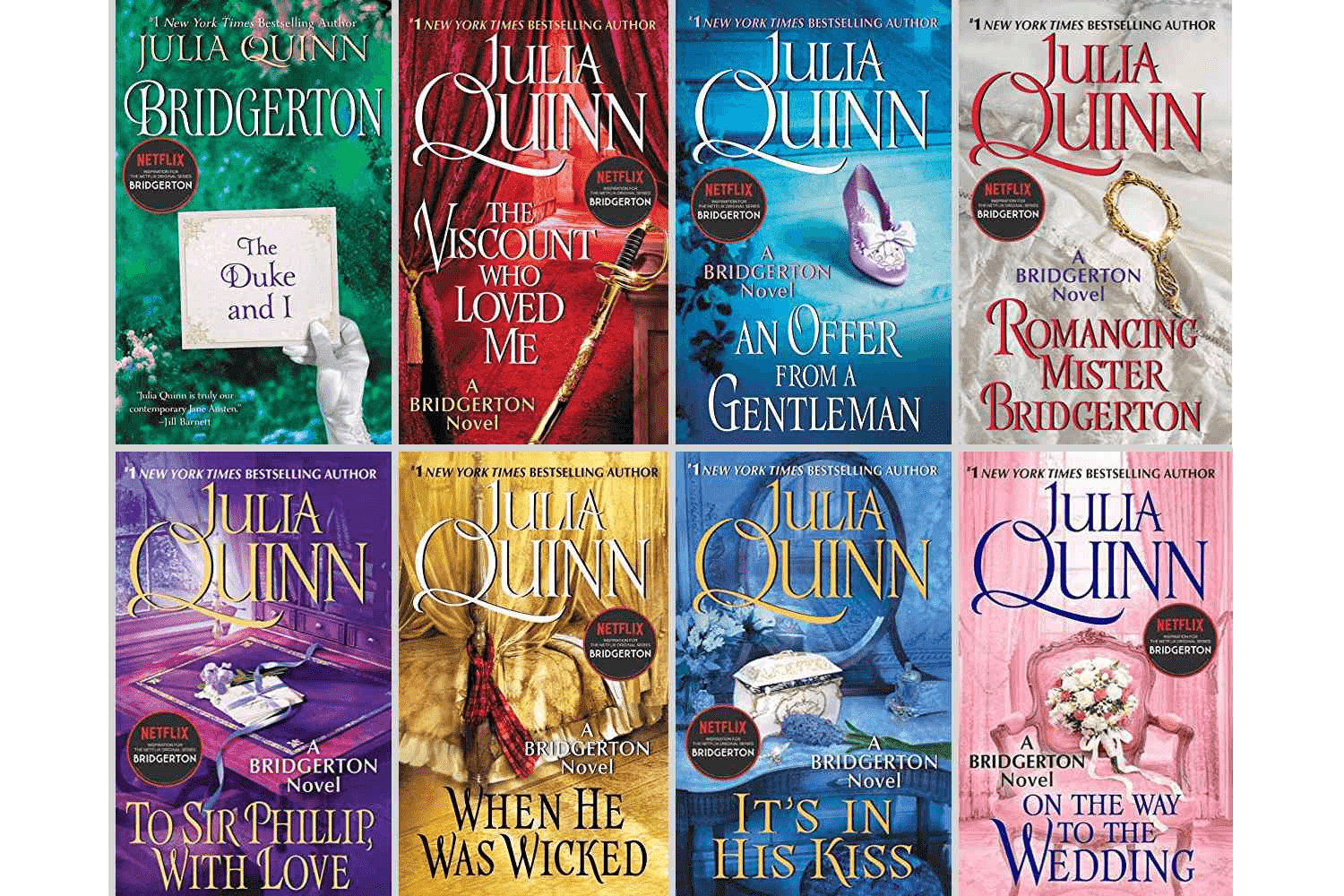
Bridgerton book series by Julia Quinn

Bridgerton book series by Julia Quinn

Research Question

How connected are the different characters in the Bridgerton universe?

Research Question

How connected are the different characters in the Bridgerton universe?

Research Question

How connected are the different characters in the Bridgerton universe?

Process

Local Gem, Untapped Potential

Process

Local Gem, Untapped Potential

Process

Local Gem, Untapped Potential

Research

Explored existing network visualizations and selected Bridgerton for its rich web of relationships.

Research

Explored existing network visualizations and selected Bridgerton for its rich web of relationships.

Research

Explored existing network visualizations and selected Bridgerton for its rich web of relationships.

Data Collection

Manually compiled and verified character connections using sources like Bridgerton Wiki and Business Insider.

Data Collection

Manually compiled and verified character connections using sources like Bridgerton Wiki and Business Insider.

Data Collection

Manually compiled and verified character connections using sources like Bridgerton Wiki and Business Insider.

Classification

Defined relationship types and ranked their importance based on narrative relevance.

Classification

Defined relationship types and ranked their importance based on narrative relevance.

Classification

Defined relationship types and ranked their importance based on narrative relevance.

Visualization

Mapped and styled the network using Gephi and Figma to highlight relationship dynamics.

Visualization

Mapped and styled the network using Gephi and Figma to highlight relationship dynamics.

Visualization

Mapped and styled the network using Gephi and Figma to highlight relationship dynamics.

Research

Why the Bridgerton universe?

Research

Why the Bridgerton universe?

Research

Why the Bridgerton universe?

I began by exploring existing network visualizations to understand how stories and relationships are mapped visually. Projects like The Dark Side and the Light and Marvel Cinematic Network inspired me with their scale and interactivity. These examples led me to choose Bridgerton as my subject—its intricate character dynamics and romantic entanglements made it a compelling narrative to visualize.
Data COllection

I decided to manually create my network dataset.

To begin my process, I started by noting down the characters from the Business Insider interactive site. Then I would cross reference it with the information on Bridgerton Wiki. This workflow was very effective as I was able to double-check my information from two sources. Luckily the Bridgerton Wiki site was well documented, the hyperlinks helped reducing time of scanning through the whole page.

Data COllection

I decided to manually create my network dataset.

To begin my process, I started by noting down the characters from the Business Insider interactive site. Then I would cross reference it with the information on Bridgerton Wiki. This workflow was very effective as I was able to double-check my information from two sources. Luckily the Bridgerton Wiki site was well documented, the hyperlinks helped reducing time of scanning through the whole page.

Data COllection

I decided to manually create my network dataset.

To begin my process, I started by noting down the characters from the Business Insider interactive site. Then I would cross reference it with the information on Bridgerton Wiki. This workflow was very effective as I was able to double-check my information from two sources. Luckily the Bridgerton Wiki site was well documented, the hyperlinks helped reducing time of scanning through the whole page.

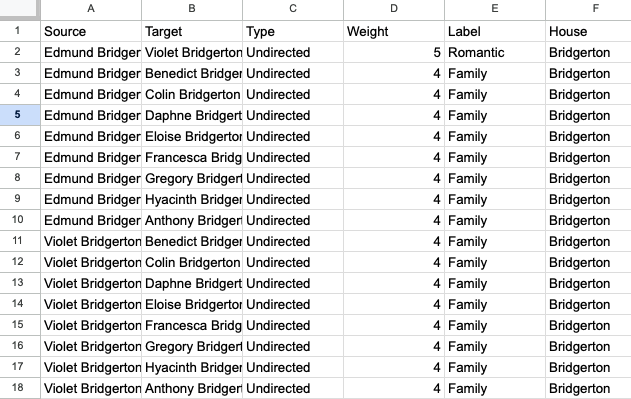
I recorded my findings in Google Sheets.

I created an edge table, with 6 columns: source, target, type, weight, label, and house (I soon realized that I would have to manually add a house column into the node spreadsheet generated by Gephi).

I recorded my findings in Google Sheets.

I created an edge table, with 6 columns: source, target, type, weight, label, and house (I soon realized that I would have to manually add a house column into the node spreadsheet generated by Gephi).

I recorded my findings in Google Sheets.

I created an edge table, with 6 columns: source, target, type, weight, label, and house (I soon realized that I would have to manually add a house column into the node spreadsheet generated by Gephi).

The graph type is Undirected, as between people, most often they both know each other. I decided to rank my connection type based on the themes of the show.
Romance (5)

Ranks first as the story starts and follows along the main character’s journey to find love.

Romance (5)

Ranks first as the story starts and follows along the main character’s journey to find love.

Romance (5)

Ranks first as the story starts and follows along the main character’s journey to find love.

Family (4)

Focused on immediate family, emphasizing the era’s values of loyalty, duty, and household roles.

Family (4)

Focused on immediate family, emphasizing the era’s values of loyalty, duty, and household roles.

Family (4)

Focused on immediate family, emphasizing the era’s values of loyalty, duty, and household roles.

Friends (3)

Though rare, key friendships help drive major character development.

Friends (3)

Though rare, key friendships help drive major character development.

Friends (3)

Though rare, key friendships help drive major character development.

Acquaintance (2)

Covers exes, casual friends, distant relatives, and other low-strength social ties.

Acquaintance (2)

Covers exes, casual friends, distant relatives, and other low-strength social ties.

Acquaintance (2)

Covers exes, casual friends, distant relatives, and other low-strength social ties.

Working (1)

Includes recurring side characters with employer/employee dynamics.

Working (1)

Includes recurring side characters with employer/employee dynamics.

Working (1)

Includes recurring side characters with employer/employee dynamics.

To standardize the workflow and the process, I decided to create some rules to follow. There are some exceptions.

I noticed that there were a lot of distant cousins, exes, frenemies, and love affairs which made it complicated to rank. Does a sister-in-law count as family or acquaintance? Does a deceased partner count as a romance or family? Another complication I had was how to categorize people into houses, as I was cross-referencing my sources, there were female characters who changed their last names.

To standardize the workflow and the process, I decided to create some rules to follow. There are some exceptions.

I noticed that there were a lot of distant cousins, exes, frenemies, and love affairs which made it complicated to rank. Does a sister-in-law count as family or acquaintance? Does a deceased partner count as a romance or family? Another complication I had was how to categorize people into houses, as I was cross-referencing my sources, there were female characters who changed their last names.

To standardize the workflow and the process, I decided to create some rules to follow. There are some exceptions.

I noticed that there were a lot of distant cousins, exes, frenemies, and love affairs which made it complicated to rank. Does a sister-in-law count as family or acquaintance? Does a deceased partner count as a romance or family? Another complication I had was how to categorize people into houses, as I was cross-referencing my sources, there were female characters who changed their last names.

1

Brimsley – Queen Charlotte

Working to Friends

After decades of working for Queen Charlotte, they went through a lot of up and downs together.

Brimsley – Queen Charlotte

Working to Friends

After decades of working for Queen Charlotte, they went through a lot of up and downs together.

1

Brimsley – Queen Charlotte

Working to Friends

After decades of working for Queen Charlotte, they went through a lot of up and downs together.

2

Simon Basset – Lady Danbury

Acquaintance to Family

Simon Basset is an orphan, he does not have any close relatives except for Lady Danbury who is a mother figure to him.

Simon Basset – Lady Danbury

Acquaintance to Family

Simon Basset is an orphan, he does not have any close relatives except for Lady Danbury who is a mother figure to him.

2

Simon Basset – Lady Danbury

Acquaintance to Family

Simon Basset is an orphan, he does not have any close relatives except for Lady Danbury who is a mother figure to him.

3

Eloise Bridgerton – Theo Sharpe

Romance to Acquaintance

Their connection was short-term and shallow, she ended up rejecting him even though he still liked her.

Eloise Bridgerton – Theo Sharpe

Romance to Acquaintance

Their connection was short-term and shallow, she ended up rejecting him even though he still liked her.

3

Eloise Bridgerton – Theo Sharpe

Romance to Acquaintance

Their connection was short-term and shallow, she ended up rejecting him even though he still liked her.

4

Jack Featherington

Family to Acquaintance

Even though he was briefly married to one of the Featherington sisters, he is quite irrelevant as a character.

Jack Featherington

Family to Acquaintance

Even though he was briefly married to one of the Featherington sisters, he is quite irrelevant as a character.

4

Jack Featherington

Family to Acquaintance

Even though he was briefly married to one of the Featherington sisters, he is quite irrelevant as a character.

First Iteration

Coming up with a general layout.

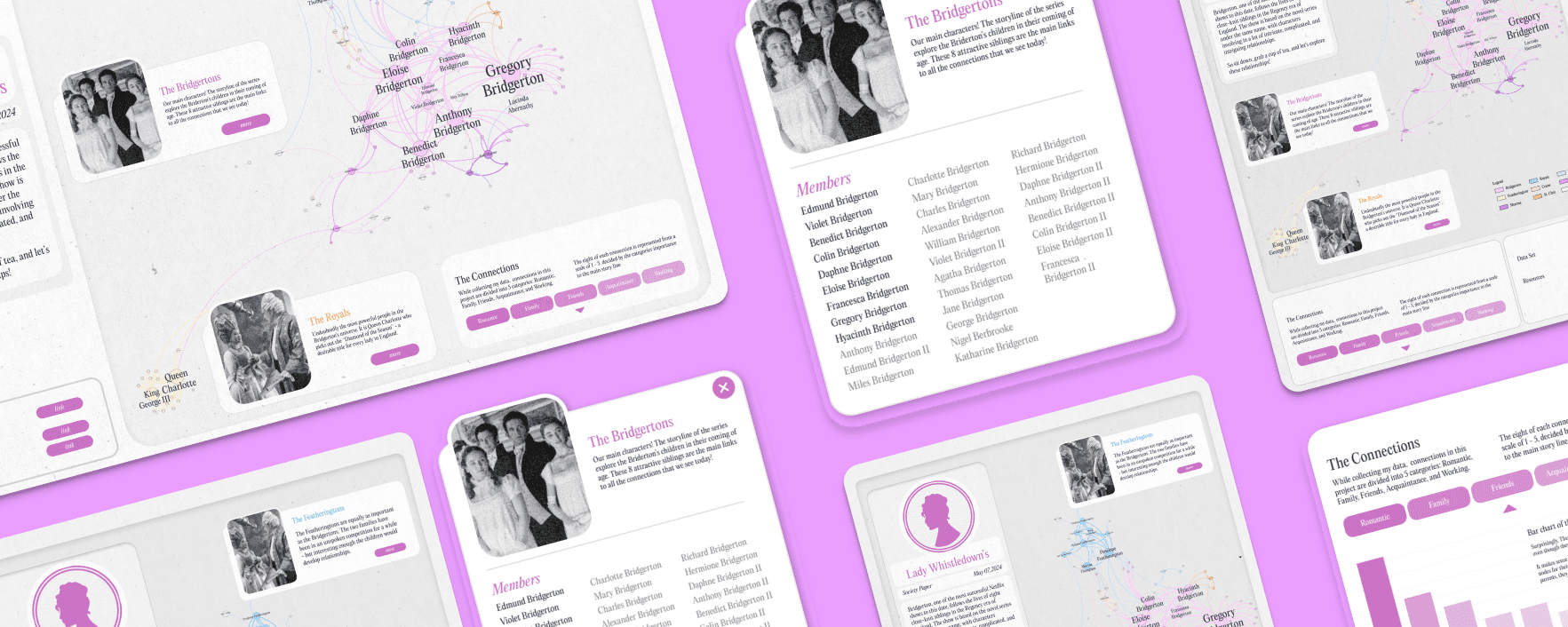
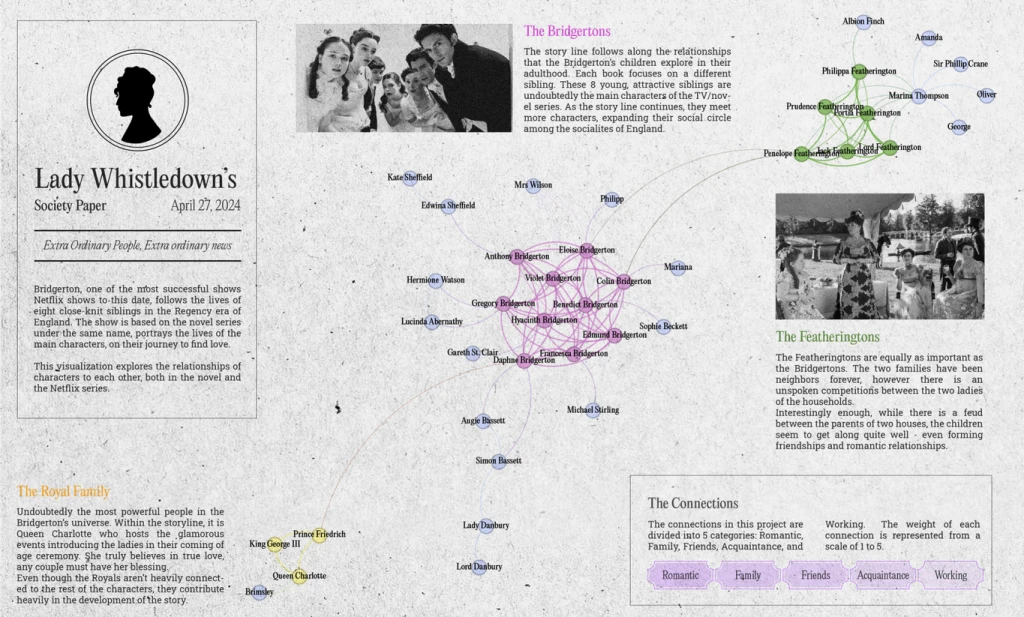
I am quite proud of my first iteration of this project. The visuals are inspired by vintage newspapers, with a modern twist of pastel pops of colors. My data was still incomplete at this point with 40 nodes and 105 edges. There were also duplicates, as I was counting connections twice. I realized that I had some typos as well (Simon Bassett, instead of Simon Basset.) The project was getting visually dense, as there as a lot of text. The labels also felt like they were overcrowding the nodes.

First Iteration

Coming up with a general layout.

I am quite proud of my first iteration of this project. The visuals are inspired by vintage newspapers, with a modern twist of pastel pops of colors. My data was still incomplete at this point with 40 nodes and 105 edges. There were also duplicates, as I was counting connections twice. I realized that I had some typos as well (Simon Bassett, instead of Simon Basset.) The project was getting visually dense, as there as a lot of text. The labels also felt like they were overcrowding the nodes.

First Iteration

Coming up with a general layout.

I am quite proud of my first iteration of this project. The visuals are inspired by vintage newspapers, with a modern twist of pastel pops of colors. My data was still incomplete at this point with 40 nodes and 105 edges. There were also duplicates, as I was counting connections twice. I realized that I had some typos as well (Simon Bassett, instead of Simon Basset.) The project was getting visually dense, as there as a lot of text. The labels also felt like they were overcrowding the nodes.

Gephi Workflow

Finalizing the look of the network visualization.

Gephi Workflow

Finalizing the look of the network visualization.

Gephi Workflow

Finalizing the look of the network visualization.

Importing "House" column

I started to manually adding house column within Gephi. Luckily, I also found typos (Basset) that I made in the Google Sheets.

Nodes, Edges, and Average Degree

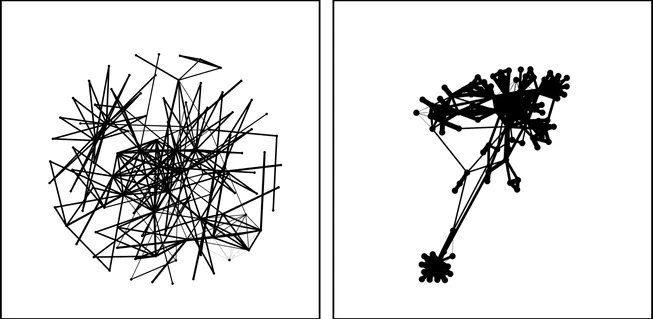
101 nodes and 244 edges were mapped, with an average degree of 4.83 and weighted degree of 17.25—suggesting moderate interaction but strong ties. After testing layouts, Force Atlas 2 best revealed emerging connection clusters.
Adding more data and color

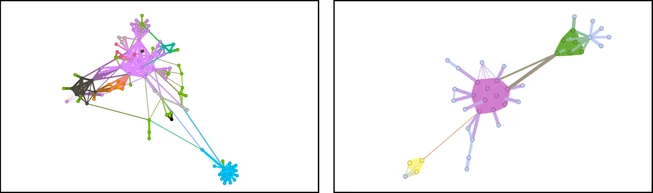
The updated data is shown in the comparison image. I added distinct colors for families that marry into the Bridgerton and Featherington lines. The Bridgertons (in pink) remain central, connecting key characters and storylines.
Interesting findings

Interesting Findings (Approved by Mrs. Whistledown!)

While exploring the network in Gephi, I noticed some unexpected patterns. Main characters didn’t always hold the largest presence, certain households showed surprising overlaps, and even supporting roles shaped the web of connections in interesting ways.

Interesting findings

Interesting Findings (Approved by Mrs. Whistledown!)

While exploring the network in Gephi, I noticed some unexpected patterns. Main characters didn’t always hold the largest presence, certain households showed surprising overlaps, and even supporting roles shaped the web of connections in interesting ways.

Interesting findings

Interesting Findings (Approved by Mrs. Whistledown!)

While exploring the network in Gephi, I noticed some unexpected patterns. Main characters didn’t always hold the largest presence, certain households showed surprising overlaps, and even supporting roles shaped the web of connections in interesting ways.

Main character ≠ largest node size

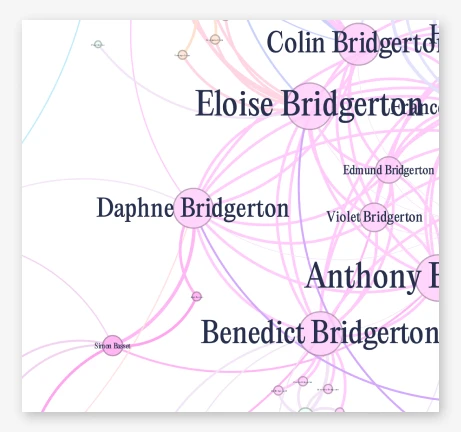
While Daphne and Simon are the main characters of the first book/season, Simon’s node is quite small based on his connection. This is because he doesn’t have family or siblings and our two main characters only have one child together. Daphne also doesn’t have many connections outside of her family.
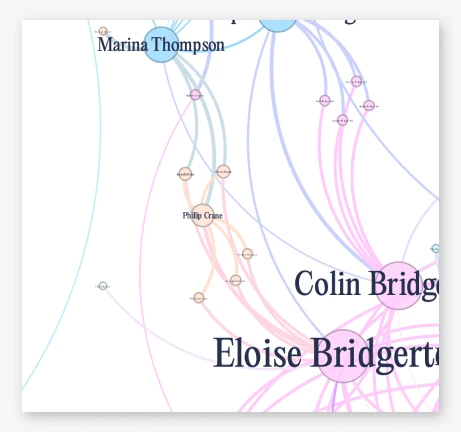
Relationship between Featheringtons and Bridgertons

There are a moderate amount of connections between the Featherington and the Bridgerton households, most of them are friendships (Aside from Penelope and Colin who got married). However, Eloise and Marina are connected through Phillip Crane and his children. They formed a connection after Marina passed away.

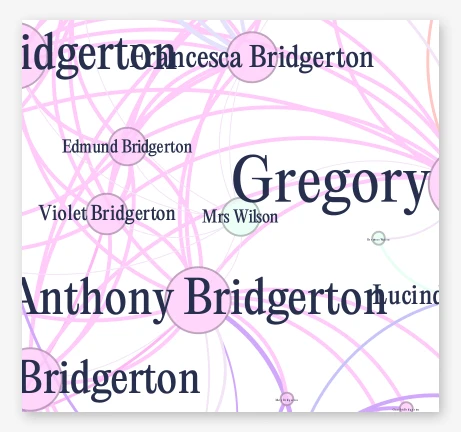
The placement of the employees of the households

I found it fascinating that both employees – Mrs. Wilson and Mrs. Varley (in green) both ended up locating in the middle of each households connections. While the weight of the connection is the lowest (1), They are equally as connected to every family member in each household – resulting in this placement.
Figma Workflow

Wireframe and sketching

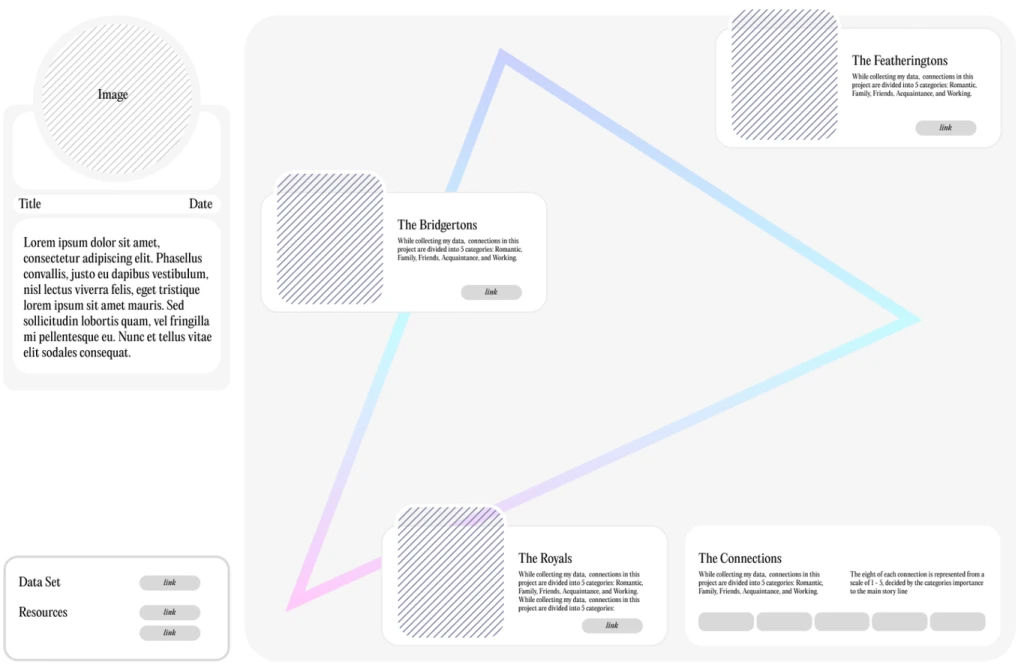
After having the general shape of my visualization, I added its shape outline to my wireframe. This provided a general guide to where I should place my interactive components. I found that personally I tend to get overly excited and then lost while I am designing. Therefore I have made a habit of creating wireframes and sketches to keep myself grounded. For styling and layout, I kept it relatively similar to my first round of revisions but added a proper grid system to keep things legible.

Figma Workflow

Wireframe and sketching

After having the general shape of my visualization, I added its shape outline to my wireframe. This provided a general guide to where I should place my interactive components. I found that personally I tend to get overly excited and then lost while I am designing. Therefore I have made a habit of creating wireframes and sketches to keep myself grounded. For styling and layout, I kept it relatively similar to my first round of revisions but added a proper grid system to keep things legible.

Figma Workflow

Wireframe and sketching

After having the general shape of my visualization, I added its shape outline to my wireframe. This provided a general guide to where I should place my interactive components. I found that personally I tend to get overly excited and then lost while I am designing. Therefore I have made a habit of creating wireframes and sketches to keep myself grounded. For styling and layout, I kept it relatively similar to my first round of revisions but added a proper grid system to keep things legible.

Adding Interactions

Adding Interactions

Adding Interactions

Legend

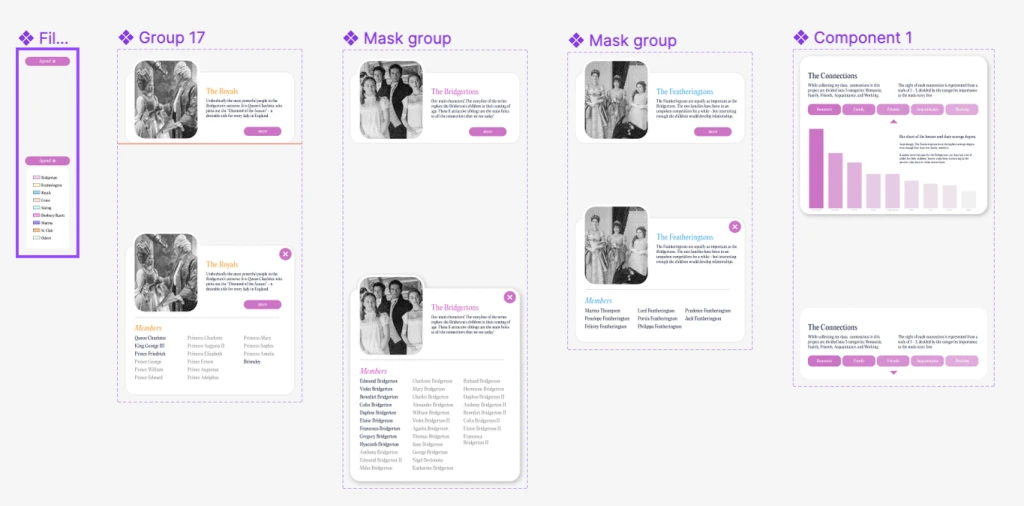
I thought it was necessary to include the legend since it is hard to interpret which color is what (aside from the three highlighted families).

Interactions

Then I created components to show the family members of each selected household. The ones in black are important to the storylines.

Average Degree

Finally, I wanted to include a bar chart of average degrees, to portray how the Featherington’s importance to the storyline, even if they are not the main leads.
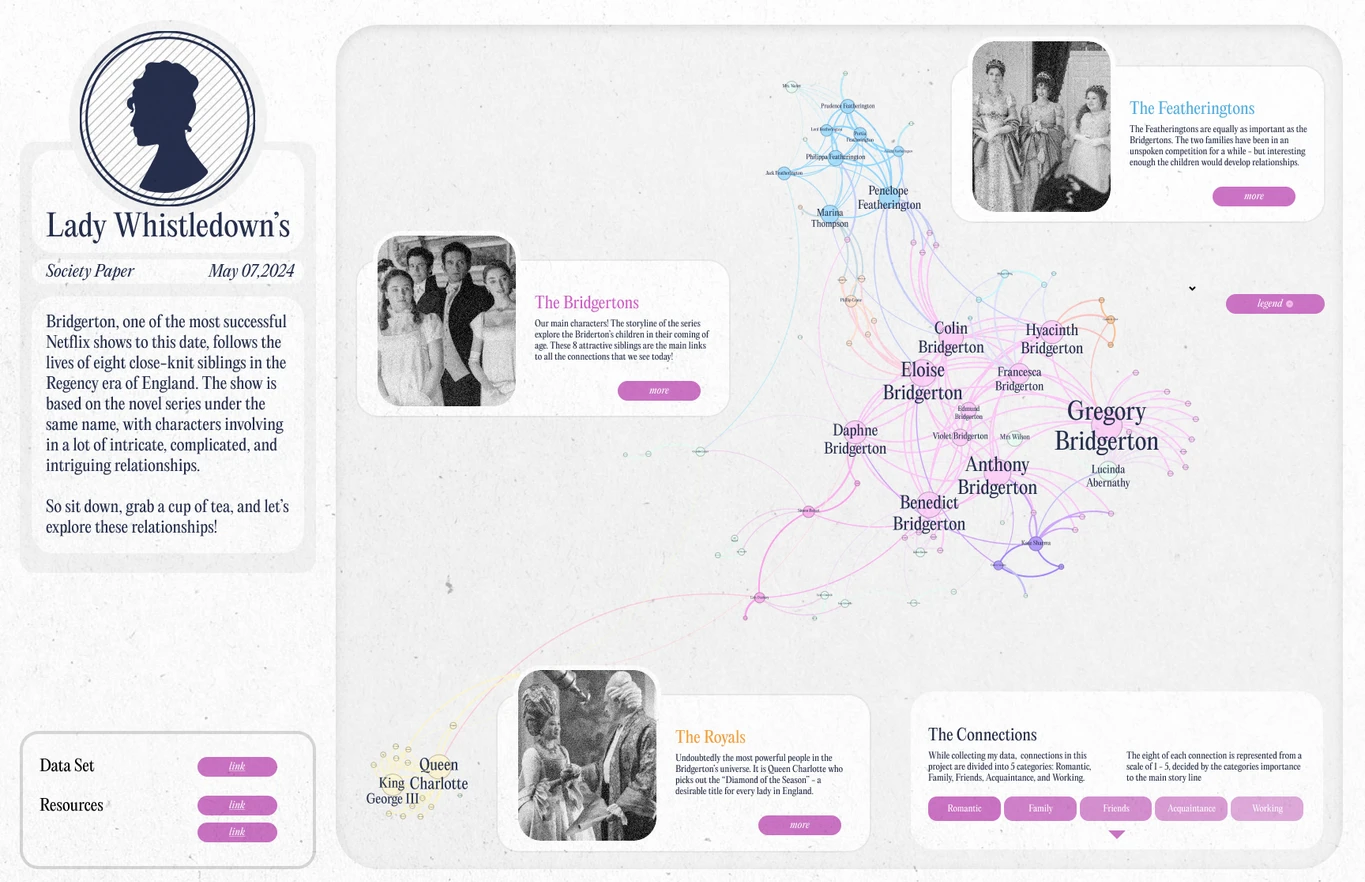
Final Product

The complicated relationships of the Bridgerton Universe

Final Product

The complicated relationships of the Bridgerton Universe

Final Product

The complicated relationships of the Bridgerton Universe

Reflections

Network visualizations can quickly feel cluttered—color coding and clearer categories improve legibility.

Reflections

Network visualizations can quickly feel cluttered—color coding and clearer categories improve legibility.

Reflections

Network visualizations can quickly feel cluttered—color coding and clearer categories improve legibility.

Using distinct labels (siblings, children, parents) added clarity beyond a generic “family” connection.

Even small tweaks in categorization can shift how relationships are understood.

There’s potential to expand into a 3D interactive format for deeper exploration.

Similar Projects

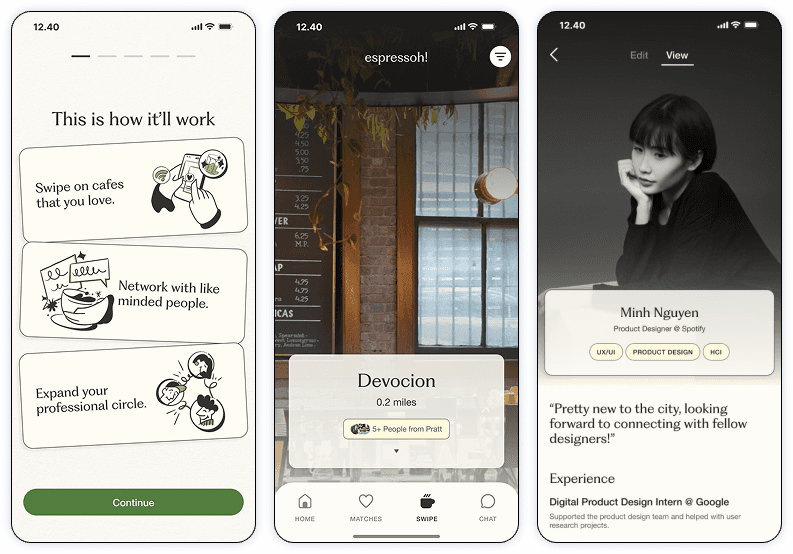
Helping young professionals turn casual coffee chats into networking opportunities

Helping young professionals turn casual coffee chats into networking opportunities

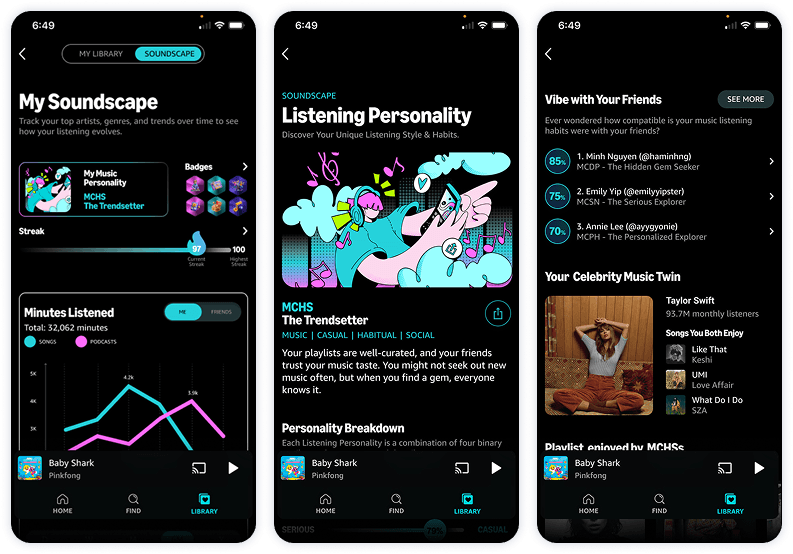
Envisioning new features to boost retention and engagement for Amazon Music

Envisioning new features to boost retention and engagement for Amazon Music

Helping young professionals turn casual coffee chats into networking opportunities

Envisioning new features to boost retention and engagement for Amazon Music

Enhancing Greenlight’s digital presence through better information hierarchy and design

Similar Projects

Ey, thanks for stopping by.

Feel free to reach out anytime, looking forward to it!

Minh Nguyen @ 2025

Ey, thanks for stopping by.

Feel free to reach out anytime, looking forward to it!

Minh Nguyen @ 2025

Ey, thanks for stopping by.

Feel free to reach out anytime, looking forward to it!

Minh Nguyen @ 2025